
Instead of rereading your career chart every time a difficult Monday makes you question your job, move one question from your Astrofluence career read into a Notion decision log. This astrology career notion workspace is a manual workflow, not an automatic connection: the read supplies reflection prompts, and Notion holds the test you choose to run in 2026.
- Astrofluence is best for a structured career read; Notion is best for tracking the decision you make from it.
- An astrology career notion workspace requires manual transfer, not an assumed automatic sync.
- Copy one relevant insight, write one work question, and schedule one test you can finish by Friday.
- Keep chart calculations separate from your interpretation and the result you observe at work.
Why this matters
A career read can give you language for direction, work rhythm, money patterns, and timing. It cannot tell you whether to accept an offer, raise a client rate, or resign. Those decisions need evidence from your actual work.
The Astrofluence career read uses repeatable calculations based on exact birth date, time, and place. Its tropical zodiac, Placidus house, and Pythagorean numerology results are the calculation layer. What those results mean for your career is an interpretation, not a prediction. Notion gives you a place to keep that distinction visible when the pressure to decide arrives.
The 2026 rule is simple: record the source, name the decision, and test one move. If you only copy paragraphs into a page, you have an archive. If you add a question and a result, you have a decision log.
Before you start
- Have your Astrofluence career read available and access to a Notion workspace where you can create a database. Use the birth date, time, and place you intend to use for the read; an incorrect time changes the chart calculation you are trying to reflect on.
- Bring one live work decision. Good candidates include choosing between two offers, changing your Monday workload, or deciding whether to price a client proposal before polishing it.
- Decide where the database will live before copying anything. Gotcha: a simple Notion table is not the database you need for properties, views, and repeatable entries. Also check who can access the page before adding personal birth details or sensitive job information.
You do not need an automation account or a connection between the products. This guide does not assume that either product sends data to the other. In 2026, the reliable setup is to read in one place and deliberately record your decision in the other.
Choose what each tool does
| Tool | Best for | What it gives you | Limit |
|---|---|---|---|
| Astrofluence career read | Framing a career question from birth-chart and numerology calculations | Structured reflection on direction, work rhythm, money pattern, and timing | Interpretive meaning does not establish what will happen at work. |
| Notion database | Keeping questions, tests, dates, and observed results together | An editable record you can review alongside real workplace evidence | A database does not calculate the chart or decide which interpretation is useful. |
Use the read to generate a question. Use the database to hold yourself to a test. Neither replaces a conversation with a manager, a written offer, or the numbers in a client proposal. For a career pivot, the useful entry is not a prediction about your next role. It is the role you are considering, the reason it matters, and what you will check before Friday.
Set up your decision database
- In Notion, select New page. Name the page something you will recognize during a busy workweek, such as Career decisions. Keep it private if the entries will mention employers, clients, or personal details.
- Add a Table database, not a simple table. Check that its columns are database properties you can edit and that you can add a new entry with New. If you have only fixed cells, return to the page and create a database table instead.
- Keep the title property for the decision itself. Name entries as questions: Should I apply for the team lead role? or Should I change my client offer? A question is easier to revisit than a label such as Career.
- Use Add property to create a Select property named Stage. Add values that reflect actual progress: Question, Test planned, Test done, and Decision made. These are labels for your own database, not Astrofluence settings.
- Add a Date property named Review date. Pick the Friday on which you will check what happened. This is your review appointment, not a date the chart predicts will be favorable.
Expected result: You have a Notion database with a question as each entry, a Stage you can change, and a Review date you can see. Create one sample entry and confirm that you can open it as a page before moving on.
If you already keep a Notion work database, you can add these properties there instead. Use a separate database when the existing one is shared with colleagues who should not see your reflections. You do not need to copy every chart detail to make this workflow useful.
Configure the decision entry
- Open your career read. Choose one passage connected to the decision in front of you, whether it concerns direction, work rhythm, money pattern, or timing. Do not import the entire read into the entry.
- Open a new Notion entry with New and title it as a specific work question. For example: Should I change the way I price this client offer? Set Stage to Question.
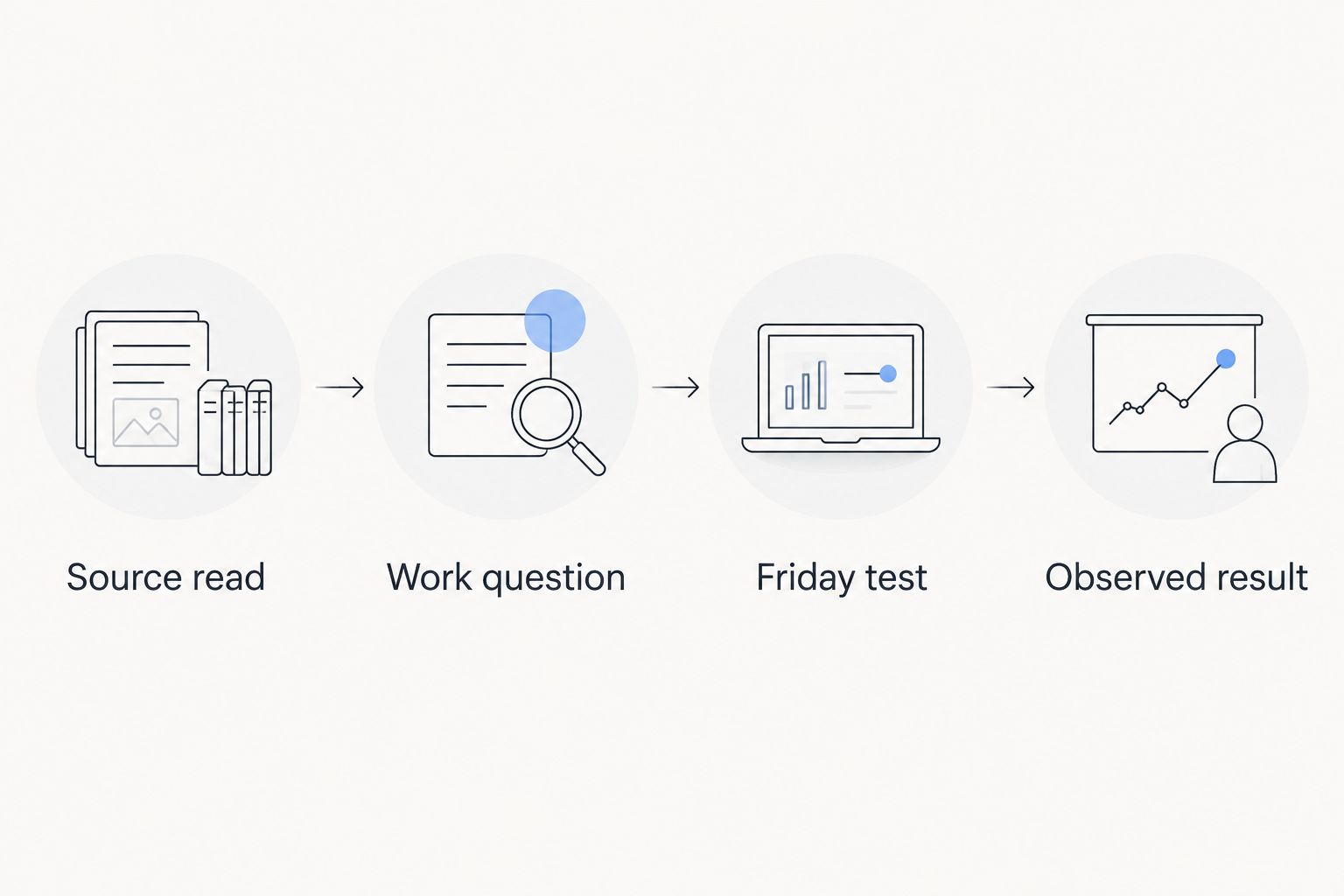
- In the page body, add four short lines with these labels: Source read, Work question, Friday test, and Observed result. They separate the material you read from the action you take and the outcome you later observe.
- Under Source read, write a brief paraphrase of the relevant insight. Identify it as an interpretation of the read. Do not present it as evidence that a manager will promote you or a client will accept a proposal.
- Under Work question, state the choice in ordinary workplace language. Replace Does my chart say I should leave? with What would I need to learn before I decide whether to leave? That change makes the entry usable without asking a reading to settle the decision.
Expected result: Someone reading the entry can tell which idea came from the read and which question belongs to your real job. The Observed result line stays blank until you have something to report.
The same structure works for a difficult Monday. Your source might prompt you to examine work rhythm. Your question becomes Which meeting or task leaves me least able to finish my priority work? Keep the reflection brief. The calendar and the work itself will supply the evidence.
Schedule a Friday test
- Under Friday test, write an action you control. For a pricing decision, draft the offer and ask a trusted colleague to identify one unclear scope line. For a career pivot, speak with someone who does the work you are considering. Do not write a test that depends on receiving an offer by Friday.
- Set Review date to this Friday. Reserve 15 minutes on that day to update the entry. This is time you choose to spend reviewing; it is not a duration required by either product.
- Change Stage to Test planned. If you use a separate calendar, put the review appointment there too. The Notion date alone does not mean a calendar event has been created elsewhere.
- On Friday, fill in Observed result with what actually happened. Record the colleague's feedback, what the role holder said, or whether you completed the draft. Change Stage to Test done even when the result is inconclusive.
- Write the next action in the entry. Decide, run a narrower test, or ask for information you still lack. Only set Stage to Decision made when you have made the decision yourself.
Expected result: The entry has a source, a question, a completed or attempted test, and an observed result. You can explain the decision without claiming the chart forecast the outcome.
Keep the test small. If you have 20 minutes before a client call, you can rewrite the offer's scope paragraph and ask whether the deliverable is clear. You cannot settle a whole career pivot in that window. A small test still gives you something concrete to review in 2026.
Use the same entry when the work question changes
A second workflow starts when you are not facing a new decision but a recurring problem. You have the same difficult Monday again. Do not make a fresh entry every time or keep copying the career read. Reopen the existing question and update the workplace evidence.
- Open the Notion entry for the recurring issue. Read Work question and Observed result before looking back at the chart interpretation.
- If the question has changed, edit the title and the Work question line. For example, Which meeting drains my Monday? becomes Can I move preparation for that meeting to Thursday?
- Replace Friday test with the next action you control. Keep the earlier result in the page body so you can see why you changed course.
- Set a new Review date and move Stage back to Test planned. At the next review, record what happened before you decide whether the change helped.
Expected result: One entry shows how your question and evidence changed. The calculation layer stays the same unless you correct the birth inputs; your interpretation and work decisions can change as you learn more. That is a feature of reflection, not an error in the workflow.
For a launch decision, use the same approach. Instead of asking whether a chart guarantees a successful launch date, ask what must be ready before you announce the offer. Your Friday test might be to show the draft to a colleague and note what they cannot understand. The answer comes from their feedback.
Troubleshooting
- Your Notion table has no editable properties. You made a simple table rather than a database. Create a Table database, then move the decision questions into new entries and add Stage and Review date as properties.
- Your entry sounds like a prediction. Find sentences that claim an offer, promotion, or launch will succeed. Rewrite each as a question or a proposed test. Keep the chart-derived interpretation under Source read.
- The Friday test is too large. Applying for a new field, changing your entire offer, or deciding to quit is not a single test. Reduce it to one conversation, one draft, or one piece of evidence you can collect by Friday.
- Your birth details or work notes are visible to others. Check the Notion page's Share settings and where the database lives. Keep sensitive personal and employer information out of shared pages. A short paraphrase is usually enough for Source read.
- Your review date passes with no result. Open the entry and record that the test did not happen. Name the blocker, choose a smaller action, and set a new Review date. Do not turn a missed task into an astrological conclusion.
Customize your workflow
Once you have used one entry from question through result, make the database easier to scan. Create a view for open questions and another for completed tests if that helps you see unfinished work. Keep the same source, question, test, and result structure in every entry; changing the format each week makes comparisons harder.
You can also separate entries by the kind of work decision they cover. Direction can hold job and role questions. Work rhythm can hold Monday routines. Money pattern can hold pricing questions. Timing can hold launch preparation. These are organizational labels you choose, not a claim that a chart provides instructions for any of those decisions.
If your next problem is remembering when to review a test, use the Astrofluence to Google Calendar workflow as a separate guide. Do not assume a Notion review date, a calendar event, and a career read sync automatically. Check each place where you expect the appointment to appear.
FAQ
Can Astrofluence automatically sync a career read to Notion?
This guide uses manual transfer and does not assume an automatic Astrofluence-to-Notion connection. Copy a relevant interpretation into a decision entry, then record your own test and result.
What goes in an astrology career notion workspace?
Put one work question, a short source-read note, a Friday test, a review date, and the observed result in a Notion database entry. Keep chart interpretation separate from workplace evidence.
Do I need to copy my full birth chart into Notion?
No. A brief paraphrase of the relevant career insight is enough to support a work question. Avoid storing birth details in a shared workspace unless you have a clear reason to do so.
Should I use a simple Notion table or a database?
Use a Notion database if you want editable Stage and Review date properties for each decision. A simple table does not serve the same tracking purpose.
Can a career reading tell me whether to accept a job offer?
No. A career reading provides a reflective frame, not a prediction or a decision on your behalf. Compare the written offer, your priorities, and any unanswered questions before you choose.
What if my Friday test does not settle the decision?
Record what happened and choose a narrower next test. An inconclusive result is useful when it shows which information you still need.
Should I create a new Notion entry every Monday?
Not for the same unresolved question. Reopen the existing entry, update its test and result, and keep the earlier evidence visible.
One last thing
Leave the result blank until you have a result. It is tempting to fill that space with what you hope will happen, especially when a job or client decision feels urgent. In 2026, the most useful astrology career notion workspace is the one that shows the gap between an interpretation and what happened at work. Pick one question today. Run one test by Friday.