
Instead of rereading your numerology results every Monday and still putting off a career decision, turn one Astrofluence read into a Google Docs plan with a question, a small work test, and a Friday review. This numerology career action plan Google Docs workflow is a manual transfer, not an automatic connection.
- Astrofluence is best for turning a calculated numerology career read into a work question, not a prediction.
- Build a numerology career action plan in Google Docs with a decision, one test, and a Friday review.
- Copy the meaning you want to examine, but keep the calculation separate from your interpretation.
- If the work decision changes, revise the test instead of treating the read as a fixed instruction.
Why this matters
A numerology read can give you language for a pattern. It cannot tell you whether to accept an offer, raise a client rate, or leave a difficult role. The useful output is a test you can complete at work, followed by evidence you can review.
Astrofluence uses Pythagorean numerology, including master numbers 11, 22, and 33, alongside birth-chart calculations. Those calculations are repeatable. The career meaning you draw from them is reflective. In 2026, keep that distinction visible in your document so a difficult Monday does not turn into a claim that a number made your decision for you.
Google Docs gives the reflection a place to become specific. Your document can hold the wording from the read, the decision in front of you, what you will do by Friday, and what actually happened. You can change the plan when the evidence changes. The read stays a source of questions, not a standing instruction.
Astrofluence is best for people who want a calculated numerology career read to prompt a practical work test, not predict the result. Its limit matters here: the meaning layer does not replace your judgment about your job, clients, or money.
Before you start
- Have your Astrofluence read available and access to a Google account that can create a document in Google Docs. Use the exact birth date, time, and place required for your read rather than filling gaps from memory.
- Pick one live decision. Examples: whether to propose a different work rhythm, how to frame a client offer, or what to ask before accepting a new responsibility. Do not try to plan your whole career in one document.
- Decide what you can safely record. Gotcha: a work plan can contain private birth details, client information, and salary discussions. You do not need to paste birth data into the Google Doc. Keep its sharing setting at Restricted unless you intend to give someone access.
Set aside 15 minutes for the first draft. That is a planning limit, not a claim about how long the read takes. Your goal is a usable 1-page plan, not a polished account of every number or chart placement.
Set up your Google Doc
- Open Google Docs under the Google account where you want to keep the plan. Select Blank document and replace Untitled document with a name that identifies the decision, such as Career pivot test, 2026. Avoid putting a birth date or another sensitive detail in the title.
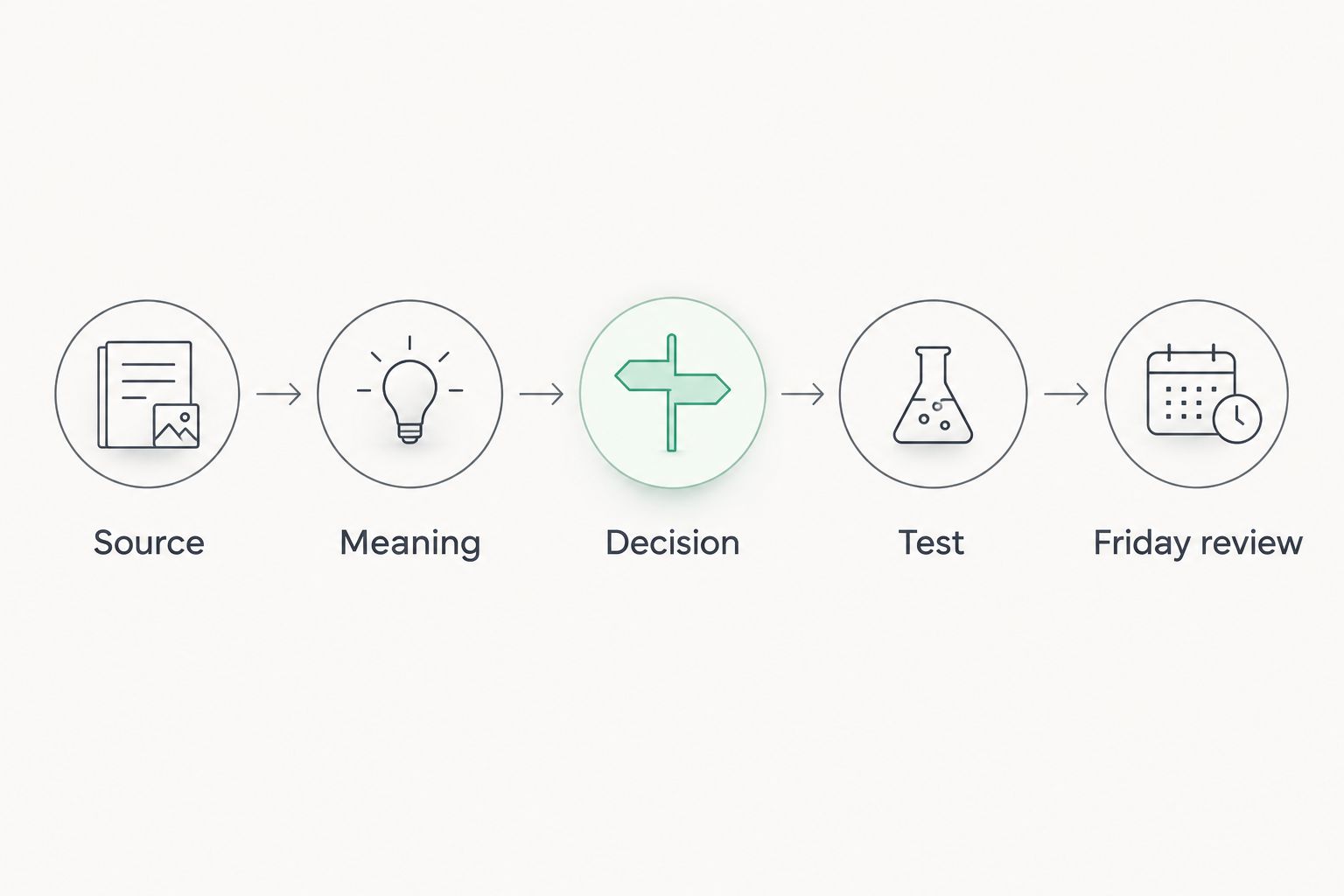
- Add these headings on separate lines: Decision, Source, Meaning, Test, and Friday review. These are headings you write in the document, not Google Docs menu labels. Leave space below each one.
- Select Share and check General access. Choose Restricted if you do not need a collaborator. Select Done when the setting matches who should see the document.
You should now have an empty decision plan with a clear place for the read and a separate place for your own action. If you already keep a career planning document, you can add these headings there instead of creating another file; the comparison below shows when each choice fits.
| Document choice | Best for | Benefit | Limitation |
|---|---|---|---|
| New Google Doc | One decision that needs a clean start | Keeps the read and test easy to find | Can become another file to maintain |
| Existing Google Doc | An active career plan you already review | Keeps the decision beside your current work notes | Older notes can bury the Friday test |
In 2026, choose the document you will actually reopen. A new file is not automatically better. If your existing plan is where you prepare for manager meetings every week, put the test there.
Transfer the read without turning it into a verdict
- In Astrofluence, find the numerology wording that speaks to the work decision you chose. Copy only the relevant passage or write a short paraphrase under Source. Identify it as coming from your Astrofluence read so you can tell it apart from your own notes later.
- Under Meaning, write what that passage makes you question. Use your own words. For example: Am I avoiding a direct pricing conversation because I keep revising the offer? That is a question you can investigate, not a fact the calculation establishes.
- Under Decision, write the choice in plain terms: Keep refining the offer, or send the current version to a client for feedback. Name the real alternatives. If you cannot name them, the document is still a reflection, not an action plan.
- Add a line beneath Source that says which part is calculated and which part is your interpretation. The number belongs to the calculation layer. A statement about what you should do at work belongs to the meaning layer, where you can challenge it.
Expected result: someone reading your document can distinguish the Astrofluence numerology read from your proposed career move. They should not have to guess whether a sentence is a calculation, a reflective prompt, or your decision.
This separation is useful when a read feels unusually accurate. You can recognize yourself in a description and still reject an action that does not fit your circumstances. Your manager's requirements, the terms of an offer, and the work on your calendar remain evidence. Numerology does not override them.
Configure a test you can finish by Friday
- Under Test, write one action small enough to complete by Friday. If your question is about pricing, send a draft offer to a trusted reviewer and ask where the value is unclear. If it is about work rhythm, propose a specific change to the way one recurring task is handled.
- Write the signal you will look for before you act. For a draft offer, that signal might be whether the reviewer understands the scope without an explanation. For a work-rhythm change, it might be whether the revised schedule lets you finish the task you selected. These are observations to collect, not outcomes the read promises.
- Add a limit. State what you will not decide from this single test. A conversation about an offer does not require you to quit your job. Feedback on a draft does not require you to change every service you provide.
- Under Friday review, leave 3 lines: What I did, What happened, and Next move. On Friday, fill them in with events rather than impressions. If no one replied, write that. If the question changed, write the new question.
Expected result: your Google Docs plan contains one action, one observable signal, and a place to record the outcome. The plan works even if the read's interpretation does not feel right after the test.
A strong test can be ordinary. You might ask your manager which part of a proposed responsibility matters most before you accept it. You might price the offer before spending another day perfecting the wording. The move is useful because it creates information you did not have on Monday, not because a number guaranteed the answer.
If you are using a read that combines numerology with chart material, keep the same boundary for both. Astrofluence calculates a chart using the tropical zodiac and Placidus houses. You can record a career prompt from that material beside a numerology prompt, but neither is evidence that a particular offer will succeed. For a closer look at how the two can inform one question, read how astrology and numerology can be combined for career decisions.
Update the plan when the work question changes
The second useful workflow starts with an existing document. You are not reconnecting an account or waiting for a sync. You are revising the question when your work changes.
- Open the Google Doc you already made and read Friday review first. Identify the last action and what happened. Do not start by rereading the numerology passage.
- Replace the text under Decision if the choice has changed. A promotion question can become a workload question once you learn what the role requires. Keep the earlier result in Friday review so you do not lose the reason for the change.
- Revisit Meaning and ask whether it still helps frame the new decision. If it does not, write a fresh question. You do not need to force the old interpretation to fit.
- Replace the action under Test with one step you can finish by the next Friday. Then check Share before involving anyone else. You can discuss a work question without giving a colleague access to your private notes.
Expected result: the document tracks a changing career decision while preserving what you learned from the earlier test. In 2026, treat an updated plan as a sign that you are responding to evidence, not as a failure to follow the original read.
Troubleshooting
The read sounds relevant, but the plan has no action
Your Meaning section is probably doing the work of Test. Rewrite the idea as a question about something observable. Then choose a message to send, a draft to show, or a conversation to schedule by Friday. If the action still sounds like becoming more aligned, make it smaller and name what another person will see.
The calculation and your interpretation are mixed together
Separate them under Source and Meaning. Record the number or wording from the read in Source. Put claims such as I should launch now or I am bad at managing money in Meaning, then turn them into questions. Astrofluence's calculation can be repeated; that workplace conclusion is yours to examine.
The document was shared more widely than you intended
Open Share, inspect General access, and select Restricted if wider access was not intentional. Check who has access before adding private notes about a colleague, client, or offer. For a conversation at work, share the specific question separately rather than handing over the full reflection.
Friday arrives and you have no result
Write what happened under Friday review. If you did not send the message, say so and identify the blocker: you needed an answer from someone, the draft was unclear, or the test was too large. Reduce the next test to a step you control. Do not treat a missed action as a verdict from numerology.
You want the plan to update itself
This guide uses a manual copy-and-review process. The document does not change merely because your work situation or interpretation changes. Reopen it when the decision changes, revise Decision, and set another Friday test. That is the maintenance step, not a technical error to fix.
Customize your workflow
Once the first test is complete, keep one decision per section of your document. Use the same Source, Meaning, Decision, Test, and Friday review headings for each new question. That gives you a record of what the read prompted and what work actually taught you, without turning every note into a permanent rule.
If your question is about timing, define timing in workplace terms. What information do you need before you send the proposal? Who must review it? What will you prepare before the meeting? A calendar entry can remind you to do the work, but it cannot tell you whether the choice is right. Keep the decision in the document and put only the next action on your calendar.
If your question is about career direction, look at what you repeatedly choose to test. You might keep returning to responsibility, daily workload, or how you present your work. Use those repeated questions to prepare a concrete conversation. Do not turn them into a fixed job title. For a separate workflow built around a public career statement, see the Midheaven read to LinkedIn headline guide.
The next move is a Friday review, not another interpretation. In 2026, your document earns its place only when it helps you compare a question with something you did and saw. If a passage stays interesting but never leads to a test, leave it in Source and choose a different work question.
FAQ
How do I make a numerology career action plan in Google Docs?
Create a Google Doc with sections for Decision, Source, Meaning, Test, and Friday review. Put one relevant passage from your read in Source, then choose a work action you can complete by Friday.
Does Astrofluence connect automatically to Google Docs?
This workflow uses manual transfer from an Astrofluence read into a Google Doc. It does not depend on an automatic connection or claim that your document updates itself.
Should I paste my birth details into the plan?
No. You can write a useful career plan without copying your birth date, time, or place into Google Docs. Record the work question and only the part of the read you need to examine.
Can a numerology read tell me whether to change careers?
No. Astrofluence treats numerology meaning as reflection, not prediction. Use the read to frame a question, then examine the terms of the decision and what you learn from a small work test.
What belongs in the Friday review?
Record what you did, what happened, and your next move. Include a missed action or an unanswered message rather than filling the gap with an interpretation.
Is a new Google Doc better than an existing career plan?
Use a new Google Doc when one decision needs a clean start; use an existing plan when you already review it regularly. The better choice is the document you will reopen for your Friday review.
What if the interpretation does not fit my job?
Do not force it into the plan. Keep the calculation separate, replace the question under Meaning, and choose a test based on the work decision you actually face.
One last thing
On Friday, read What happened before you reread Meaning. That order makes the work visible. If the test changed your question, update the plan; if it did not, choose a smaller test for next week. The calculation stays the same. You make the decision.